
FutCheck for the EA FC Web App
The all-in-one in-browser toolkit for Ultimate Team. Solve SBCs on the pitch, or the same one many times over; turn FC Points into coins with AutoRip's silver pack method; complete Gallery Sets for the fewest coins; snipe the market at a human pace; and keep your club in sync.
Activity Overview
Everything the FutCheck FC Chrome extension has done.
Live In-App Demonstration
Select a tool below to view real in-app execution in the EA Web App.
Silver pack method automated
Silver packs are the best coins you can get for FC Points: a Large Silver Pack is 50 points and its contents sell for about 2,300 coins. AutoRip buys the packs, opens them, lists every silver at FutCheck's price and quick sells the rest, 50 packs a run, on EA's own screen.
Gold: up to 50 packs a run, with FC Points or coins. Not included on Free.
Solve SBCs directly inside the EA Web App
Reads active challenge requirements on screen and places the cheapest squad onto the pitch.
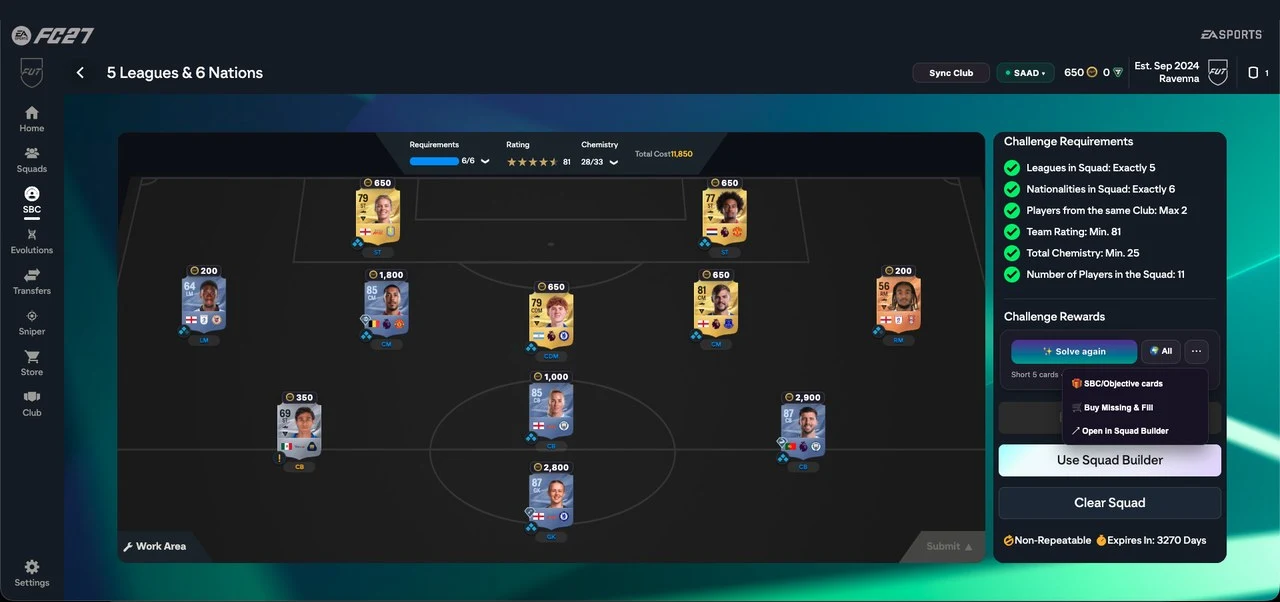
The solver attaches directly to the right rail of any active SBC challenge in the Web App. It analyzes chemistry, rating, league, nation, and rarity constraints in real time without requiring external tabs, manual card copy-pasting, or third-party credential handshakes.
Automated market search with natural delay pacing
Scan the transfer market for deals using custom buy-now, bid price, and rarity filters.
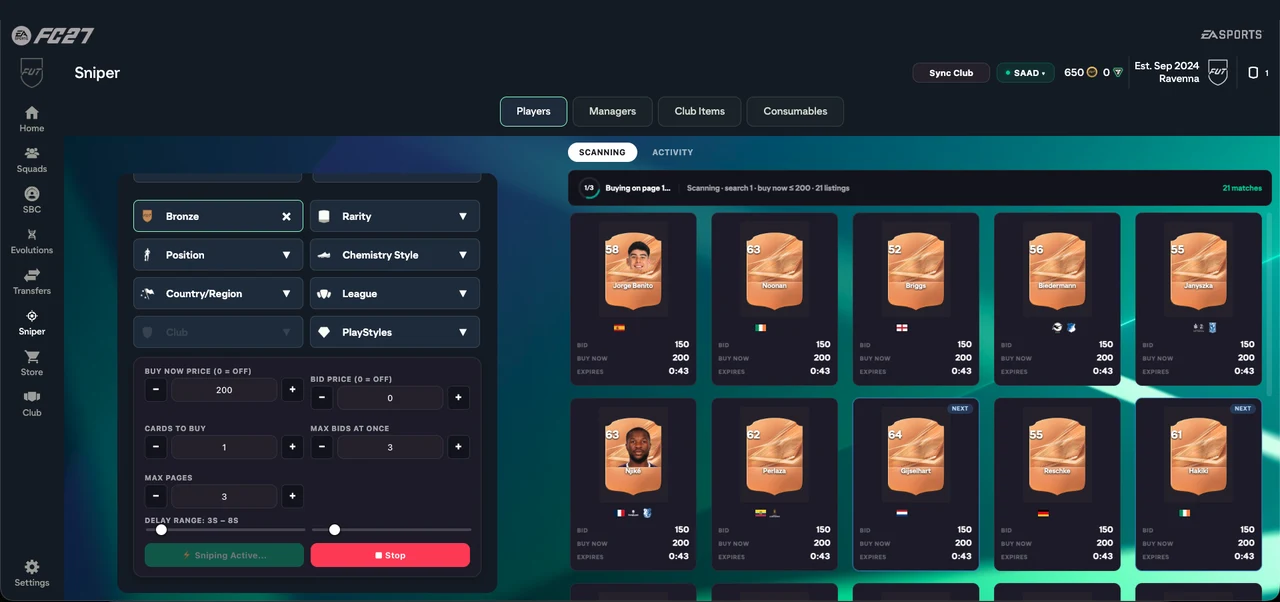
The sniper scans live market listings within the parameters you set, leaving a randomized delay of a few seconds between searches so it works at a human pace rather than hammering the market.
Real-time club and inventory synchronization
Transfers your players, storage, transfer list, and active squads into your FutCheck profile.
When you browse your club or squads in the Web App, the extension reads your card items in the background and saves them to your FutCheck account. This powers the website's squad builder and My Club page with the exact cards you own.
Complete Gallery Sets for the fewest coins
Plans each Set against your coins, buys the cheapest cards for it and lists them straight back at cost.
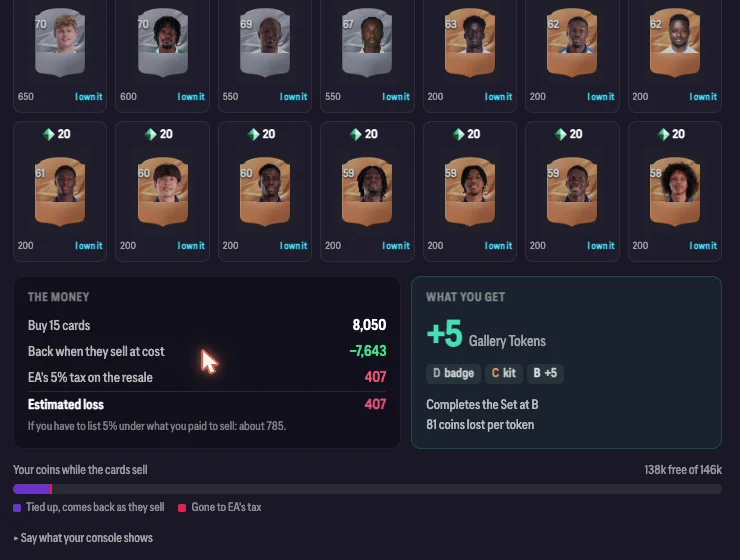
The Gallery tab sits in the Web App's left menu and ranks every Set by the grade your coins can reach. A card still counts for its Set after you sell it, so FutCheck buys what a Set needs, lists each card straight back at what it cost, and your real cost is EA's 5% tax.
AutoRip: Silver pack method automated
Silver packs are the best coins you can get for FC Points. AutoRip buys them, opens them, lists every silver and quick sells the rest, 50 packs a run.
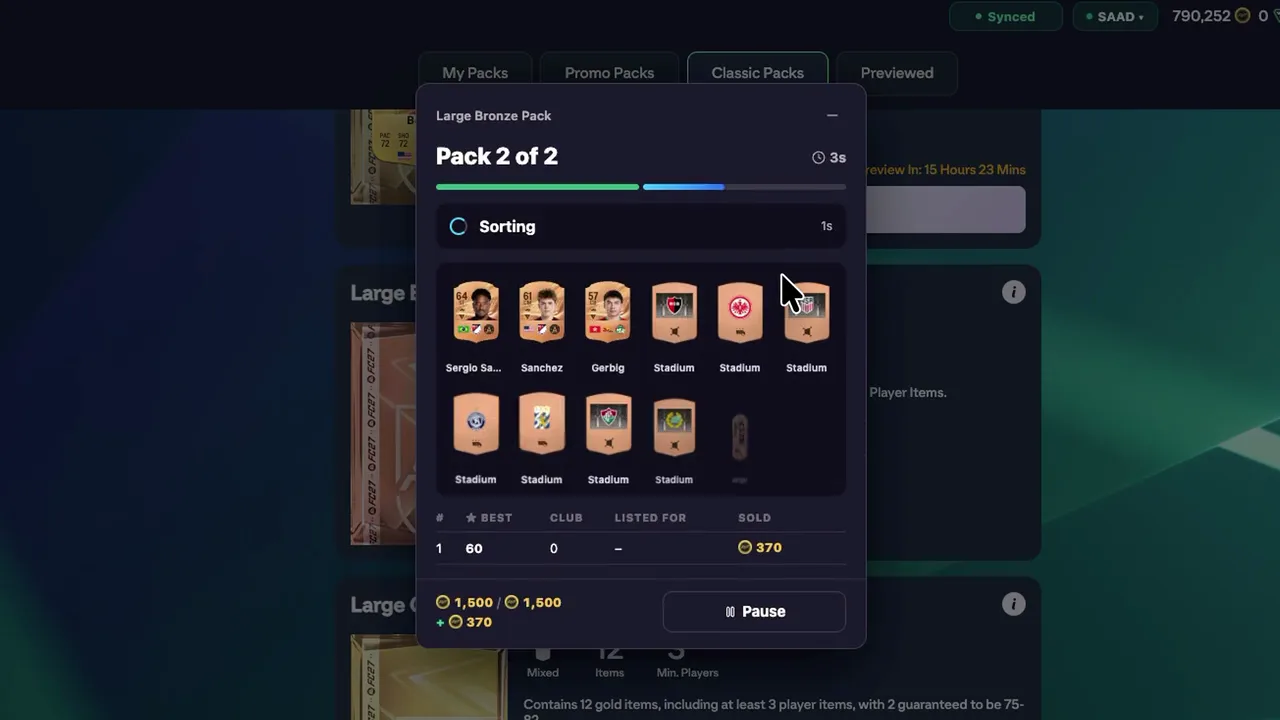
A Large Silver Pack is 50 FC Points and its contents sell for about 2,300 coins: 46 coins a point, against 26 for a gold pack (FutCheck prices, October 2026). The catch was the clicking: buy, open, list three silvers, quick sell nine consumables, repeat. AutoRip does it on EA's own screen: press ⚡ AutoRip on the pack, pay with FC Points up to the amount you set, Start. It works on any Classic or Promo pack, with coins too.
Solve the same SBC again and again
Press + on Solve: the extension counts how many times your club covers the challenge, buys the rest within your budget, and submits round after round.
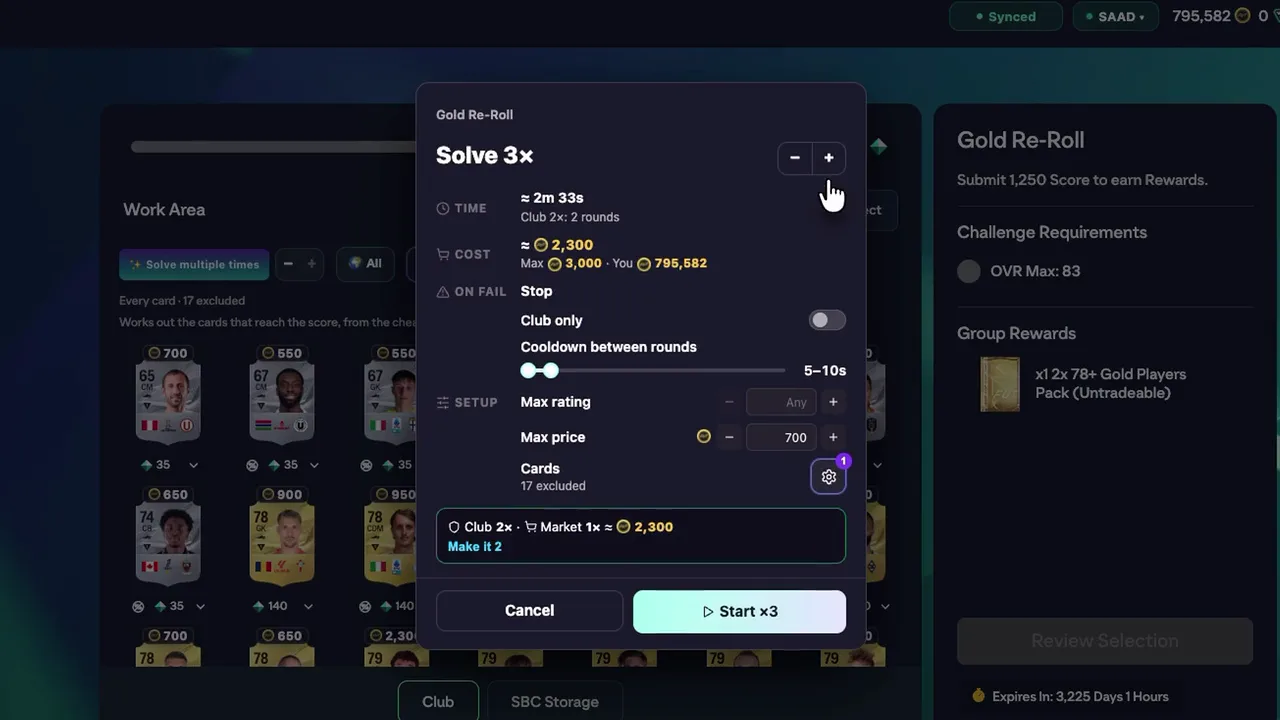
A repeatable SBC handed in ten times is ten rewards. Solve multiple times works out how many rounds your club already covers at the Max rating and Max price you set and what more would cost, then does them one after another on the same screen, with a pause between rounds, stopping to ask in its popup whenever it needs you. It never goes past the number of times EA lets the SBC repeat.
Summary of Tools & Quotas
Overview of all extension capabilities comparing Free and Gold tiers.
Solve inside SBCs
Reads league, nation, rating, and chemistry requirements on screen and places the cheapest squad onto the pitch.
Market sniper
Search for deals using custom buy-now and bid limits with natural delay pacing.
Gallery planner
Plans every Gallery Set against your coins, buys the cheapest cards for the best grade they reach and lists them straight back at cost.
AutoBuy
Searches the market, buys the cards your SBC squad is missing within your price limit, and fills them into the squad.
Club sync
Keep your club, storage, and transfer list updated on your FutCheck profile automatically.
Real-time coin cost
Shows the exact coin cost to complete the SBC and how much you need for any missing cards.
AutoRip
The silver pack method automated: buys Large Silver Packs with FC Points, opens them, lists every silver at FutCheck's price and quick sells the rest, 50 packs a run. Works on any Classic or Promo pack.
Solve multiple times
Press + on Solve: counts how many times your club covers the SBC, buys what is missing within your budget, and submits round after round with a pause between.
Gold is a one-time, one-month pass with no auto-renewal. It unlocks unlimited all-player solves and sniping, AutoBuy, Solve multiple times, AutoRip and the Gallery planner inside the extension, plus full club builder tools on the website. View pass options →
Setup & Safety Commitments
Simple 3-step installation with client-side sandbox privacy.
Installation & Setup
3 StepsSign in to FutCheck
Log in on futcheck.com so the extension recognizes your account.
Add to Chrome
Install the extension from the official Chrome Web Store.
Open the EA Web App
Open any SBC challenge and the FutCheck tool is on the right side; the Gallery has its own tab in the left menu.
Safety & Permissions
Price checks only ever search the market — never bid, buy, list or sell. Full details in our Privacy Policy.
Frequently Asked Questions
Technical specifications, permissions, and browser compatibility.
Where do I find it in the Web App?
What does AutoRip do?
How do I solve an SBC several times?
How does the Gallery buy cards, and what does it really cost?
Do the cards still count after they sell?
Why did my Gallery run stop at "Over its cap"?
Why does it say I am signed out?
How does club sync work?
Which browsers are supported?
How do I remove the extension?
Install the FutCheck Extension
Free to use, zero password entry required, and unlimited squad solving from cards in your club.
FutCheck is an independent tool, not affiliated with or endorsed by Electronic Arts Inc. EA SPORTS FC is a trademark of Electronic Arts Inc.